What Is FinancialTechWiz?
FinancialTechWiz is a trading journal aimed mostly at swing traders and active stock traders. The pitch is not complicated: connect your broker, pull in the trades, then use the journal and AI coach to work out what is helping or hurting your performance.
The product is newer than names like Tradervue, Edgewonk, TraderSync, and TradeZella, so I would not treat it as the default choice for every trader yet. But it is more than a thin AI wrapper. The app has a real dashboard, broker imports, manual logging, open-trade views, market screens, and daily AI feedback. That gives it enough substance to review seriously.
The biggest question is whether those extra screens make the journal more useful or just busier. After looking through the product, the answer is mixed in a useful way: the dashboard, broker sync, AI coach, and open-risk view are the parts that matter most. The charts and heatmaps are nice context, but they should not carry the ranking by themselves.
Dashboard And Daily Workflow
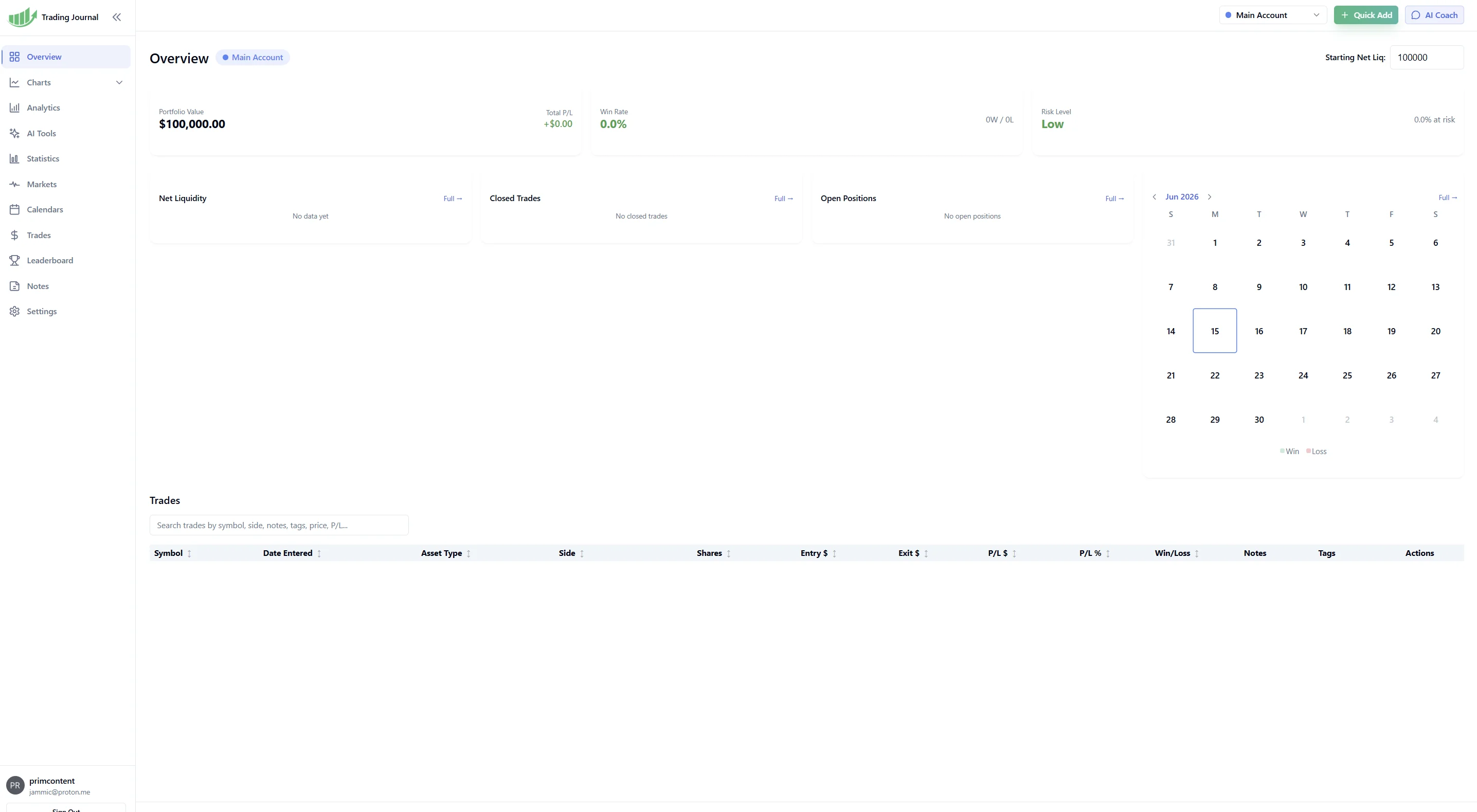
The dashboard is the best place to start because it shows how FinancialTechWiz expects traders to use the product day to day. You get portfolio value, total P/L, win rate, risk level, net liquidity, closed trades, open positions, a calendar, and a trade table on the main screen.
That layout is practical. A trader can open the page and quickly see whether the account is up or down, whether open positions are getting uncomfortable, and whether recent trading has been clustered around certain days. It does not feel like a spreadsheet with a nicer skin. It feels closer to a daily review desk.
The risk card and open positions are the most useful parts of this screen. Journals often focus too much on closed trades, but the mistakes that hurt traders usually start while a trade is still open: size is too big, the stop is ignored, or the original idea has changed. Putting open risk near the main performance numbers is a good product decision.
TraderTrac still feels stronger if the only job is fast trade capture and a clean journaling habit. FinancialTechWiz is broader. That can be an advantage for traders who want one workspace, but it also means the app has to prove that each extra screen is actually useful.
Trade Logging And Broker Imports
FinancialTechWiz supports automated imports from 25+ brokers through SnapTrade. The supported list includes common retail platforms such as Robinhood, Charles Schwab/thinkorswim, Interactive Brokers, Webull, tastytrade, Fidelity, E*Trade, TradeStation, Tradier, Coinbase, Kraken, and Public.
That matters because manual entry is where most trading journals die. A trader may be disciplined for a week, then one busy session gets skipped, then the journal is suddenly stale. Broker sync does not solve every problem, but it removes the worst part of the workflow.
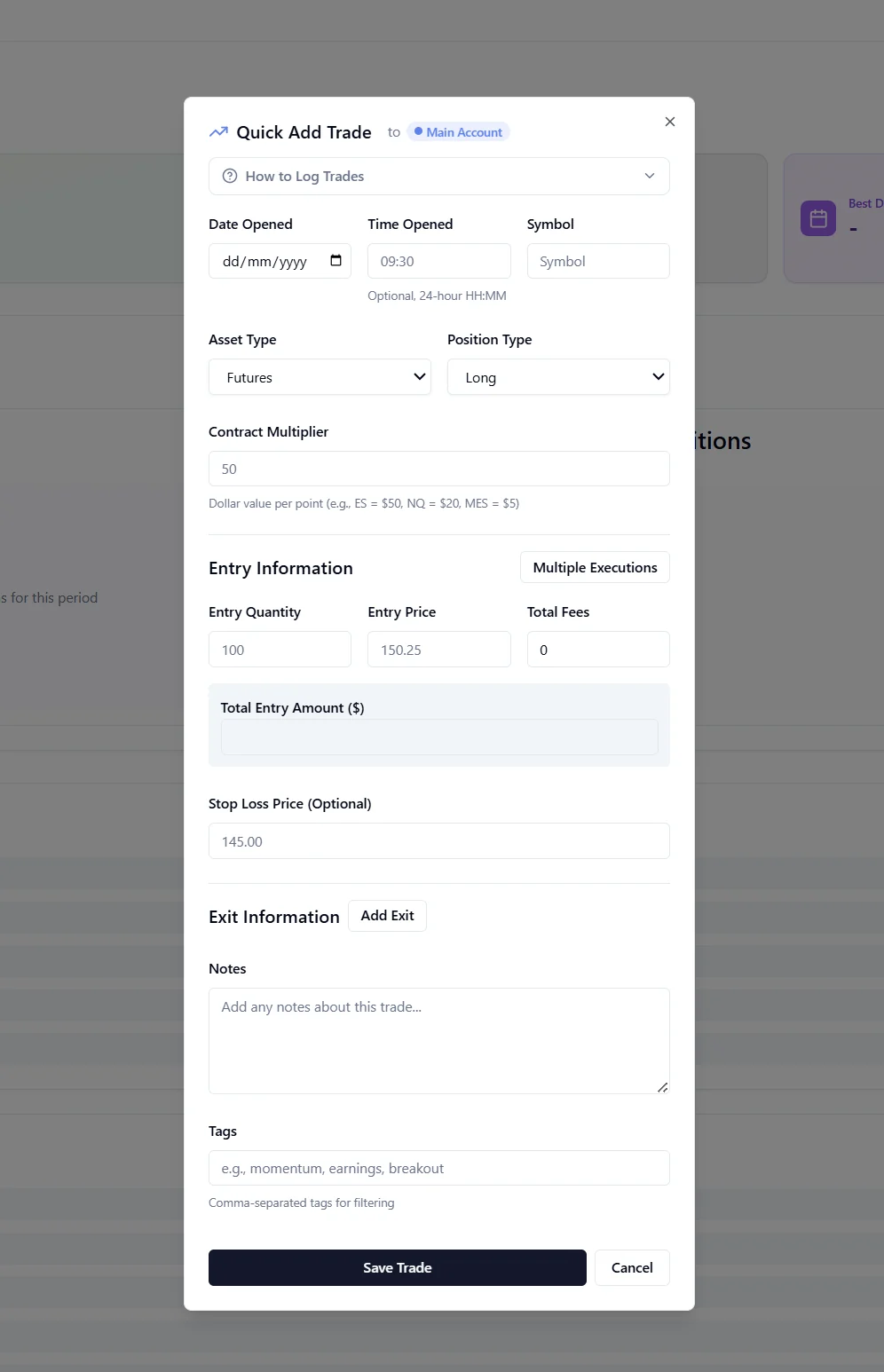
The manual logging screen still has a role. The screenshot shows fields for symbol, asset type, side, shares, entry price, exit price, stop loss, trade date, notes, and tags. That is enough to log a trade properly when an import is missing or when the trader wants to add context the broker will never provide.
The strongest workflow is broker import plus manual notes. Let the broker handle the raw execution data, then use tags and notes to capture the reason for the trade, the setup, and what was going through your head. Without that second layer, even a perfectly imported journal can become a clean record of unclear decisions.
AI Coach And Daily Insights
The AI coach is the part that gives FinancialTechWiz its clearest angle. Instead of only showing charts and ratios, it lets traders ask questions about their closed trade history in normal language.
Useful questions are things like: which setups are actually profitable, am I holding losers too long, which tickers are dragging down my results, or is my win rate better on swing trades than shorter-term trades. That is the right use of AI in a journal. It should help the trader interrogate their own data, not generate generic trading advice.
The daily insights feature is also sensible if the data is clean. A trader who reviews positions once or twice a day does not always want to dig through every report. A short prompt about recent behavior, win rate, risk, or position quality can be useful.
The catch is obvious: the AI is only as good as the journal data. If imports are incomplete, tags are lazy, or trades are missing context, the coach will have less to work with. FinancialTechWiz has the right idea here, but traders should judge the AI during the trial using their own trade history, not the marketing examples.
Markets, TradingView-Style Charts, And Heatmaps
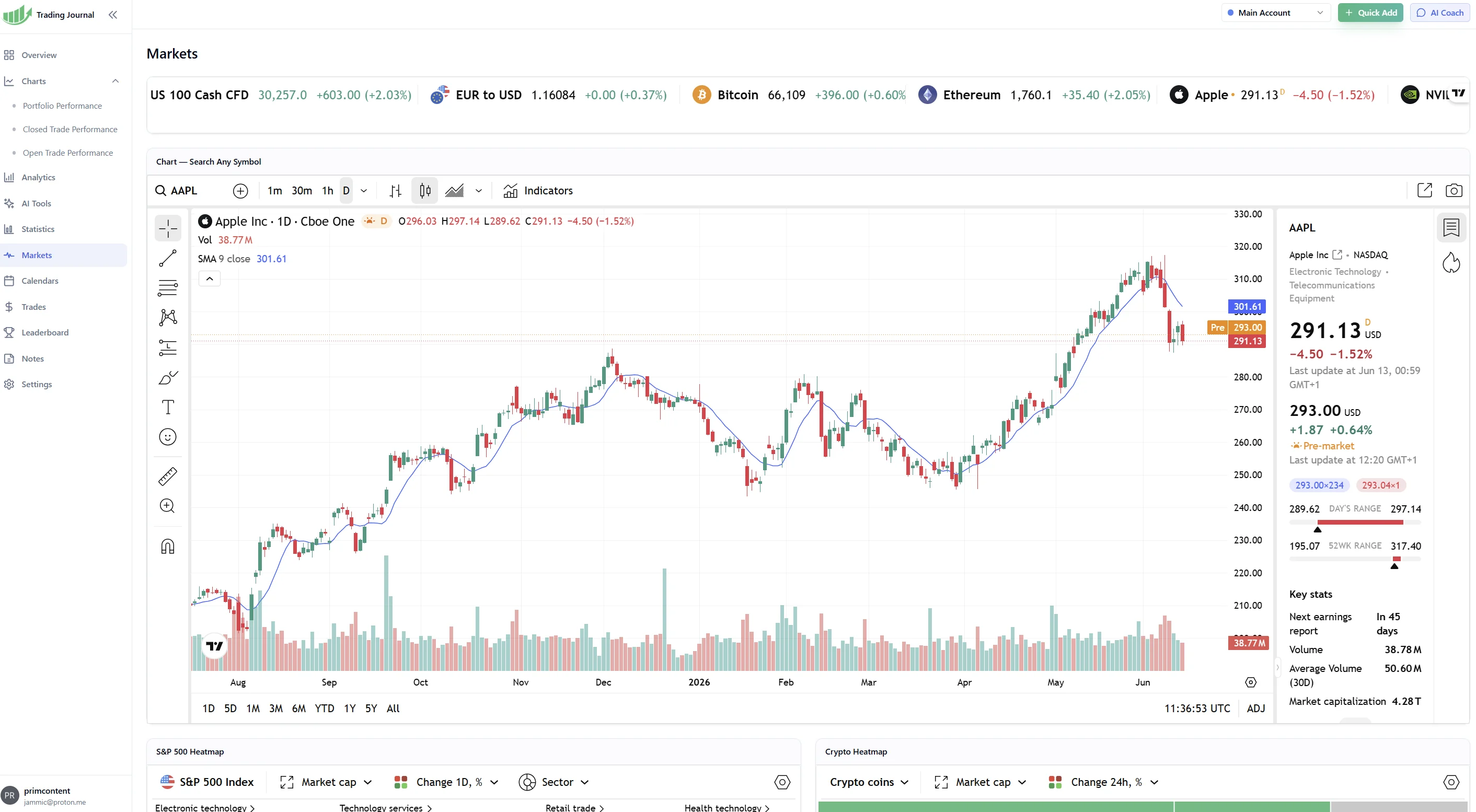
FinancialTechWiz also has a Markets screen with a TradingView-style chart area. In the screenshot, you can see the TradingView logo, symbol search, timeframe controls, drawing tools, an Indicators button, a right-side market panel, and ticker strips for instruments such as Apple, Bitcoin, Ethereum, EUR/USD, and index CFDs.
This is useful, but I would keep it in perspective. If you are reviewing an Apple trade, having the AAPL chart inside the journal can save a tab switch. The chart screen can also help a trader check broad market context before reviewing the trade notes.
The heatmaps are the weaker part of the story. They look good in screenshots, and they can be useful for a quick read on market tone, but they are not what makes a trading journal valuable. Trade capture, clean stats, broker sync, open-risk review, and useful feedback matter more.
So I would give FinancialTechWiz credit for the charting workspace, especially because it reduces context switching. I would not rank it higher just because it has market heatmaps.
Open Trade Performance And Risk Views
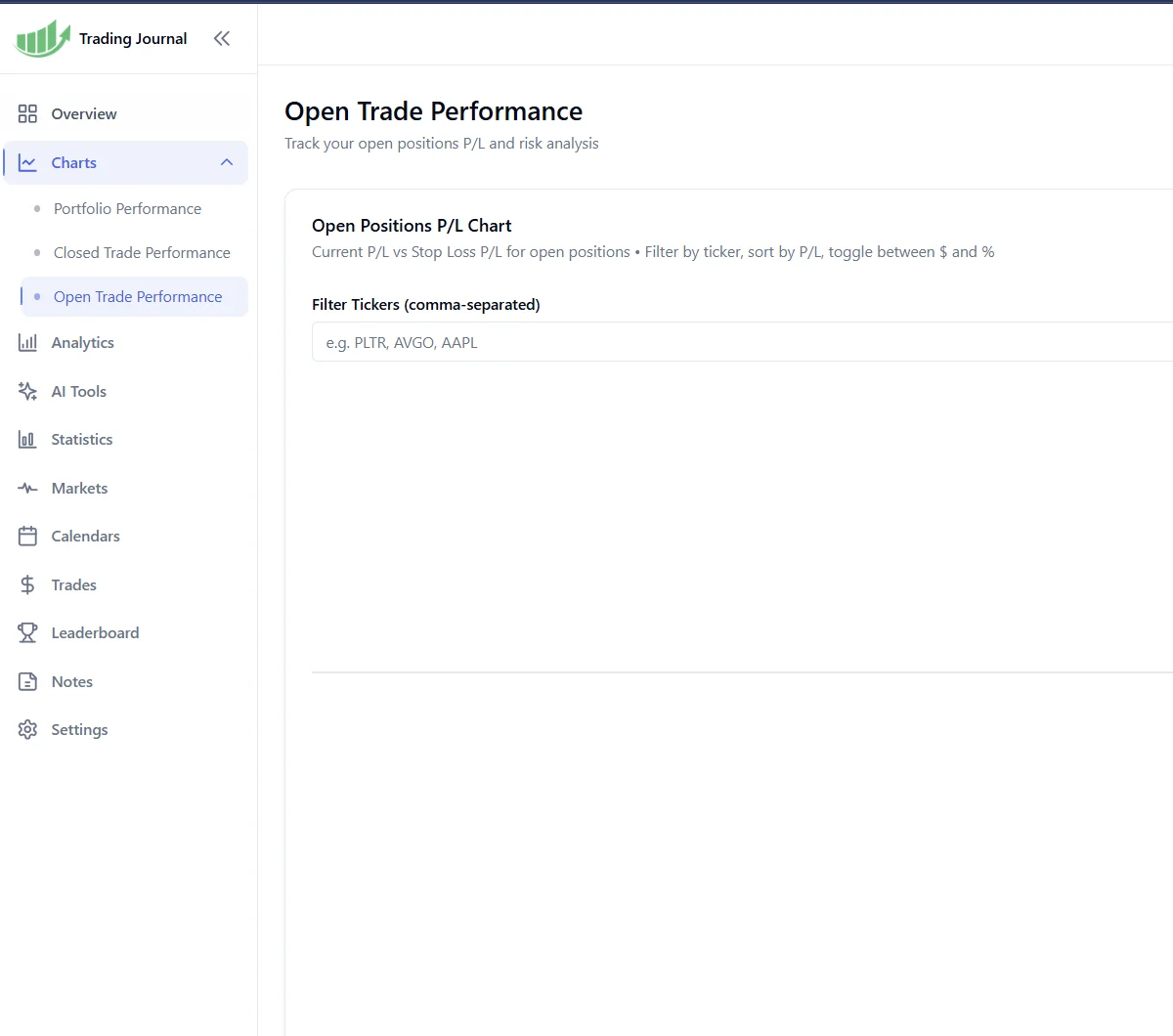
The Open Trade Performance screen is more important than the heatmaps. It focuses on current positions instead of only reviewing trades after they are closed. The screenshot shows open-position P/L, stop-loss P/L, ticker filtering, and a risk analysis area.
That is exactly the kind of screen swing traders need. If you hold positions overnight or for several days, the open trade is where risk can quietly get out of hand. A dedicated view for current P/L and stop-loss exposure helps the trader review risk before it becomes a lesson in the closed-trade report.
This is one of the better workflow choices in FinancialTechWiz. It makes the journal feel less like a post-mortem tool and more like something that can influence decisions while the trade is still alive.
Pricing
FinancialTechWiz has two main pricing options:
- Monthly: $19/month with a 7-day free trial, credit card required
- Annual: $119/year, listed as $9.91/month, with a 7-day free trial and no credit card required
The annual price is competitive. At roughly $10/month, FinancialTechWiz is cheaper than many premium trading journals with AI or advanced analytics. There is no permanent free tier inside the app, although the company does offer a separate free Google Sheets journal template.
The no-card annual trial is the better way to test it. Seven days is not a long evaluation window, but it is enough to connect a broker, import some trades, ask the AI coach real questions, and decide whether the workflow feels useful.
Honest Pros
The dashboard is useful immediately. It puts P/L, win rate, risk, open positions, calendar data, and the trade table where a trader can actually review them.
Broker imports solve a real problem. Manual journaling fails because people stop entering trades. SnapTrade-based imports from 25+ brokers give FinancialTechWiz a practical advantage.
The AI coach has the right job. It is aimed at analyzing your trading history, not pretending to be a market oracle.
The open-trade screen is genuinely relevant for swing traders. Current P/L and stop-loss exposure deserve their own view.
The annual price is fair. At $9.91/month annually, the product is priced below many premium journal competitors.
Honest Cons
There is no permanent free tier. After the trial, this is a paid tool.
Some asset coverage still needs verification. Stocks, crypto, options, and crypto futures have supporting evidence, but forex and full futures-broker coverage are not documented clearly enough to make a broad claim.
The product is still newer. It does not have the long public track record of Tradervue, Edgewonk, TraderSync, or TradeZella.
The heatmaps are not a major journaling feature. They are fine for context, but they should not be weighted like trade capture, stats, risk controls, or broker sync.
The community lives on Discord. That is fine if you already use Discord, but it is separate from the journal itself.
Who Should Use FinancialTechWiz
FinancialTechWiz is a good fit for stock-focused swing traders who want broker imports, AI review, and a dashboard they can check every day. It is also a good candidate for traders who know they will not maintain a manual journal for long.
It can also help newer traders who do not yet know which metrics to review. The AI coach gives them a way to ask direct questions instead of staring at a dashboard and guessing what matters.
I would be more cautious if you need a permanent free plan, deep futures or forex support, or a platform with a very long history. In those cases, compare it closely with Tradervue, Edgewonk, TraderSync, TradeZella, and TraderTrac before committing.
How FinancialTechWiz Compares
FinancialTechWiz vs. TraderTrac: TraderTrac is better for fast logging, clean stats, and building a simple daily journaling habit. FinancialTechWiz has broader broker import evidence, AI daily insights, and more market context. Pick TraderTrac if you want the cleanest trade journal workflow. Pick FinancialTechWiz if broker sync and AI review are more important.
FinancialTechWiz vs. TradeZella: TradeZella is the more mature premium journal, especially for replay, backtesting, polished analytics, and prop firm tracking. FinancialTechWiz is cheaper and more focused on AI review for swing traders.
FinancialTechWiz vs. Tradervue: Tradervue has the longer track record and a useful free tier. FinancialTechWiz is the newer, more AI-led option with lower paid pricing.
FinancialTechWiz vs. TraderSync: TraderSync is more established and has strong analytics. FinancialTechWiz is cheaper and puts more emphasis on conversational feedback.
The Bottom Line
FinancialTechWiz is a serious entry in the AI trading journal category. The parts that matter are broker sync, the daily dashboard, AI review, and open-position risk views. Those are real workflow features, not just marketing decoration.
The charting screen is useful, and the TradingView-style interface is a plus when reviewing trades. The heatmaps are less important. They add context, but they should not be the reason someone chooses the product.
For stock-focused swing traders who want automated imports and AI feedback without paying $30-50/month, FinancialTechWiz is worth testing. During the trial, the key checks are simple: does your broker import cleanly, does the AI coach say anything useful about your actual trades, and does the dashboard make you more likely to review risk every day?